
The panel
The panel is what the desktop app shows. It is one HTML page served by SpawnLoft itself, so it works offline and runs equally well in a browser tab:
spawnloft ui [--port 8770] [--no-open] # http://127.0.0.1:8770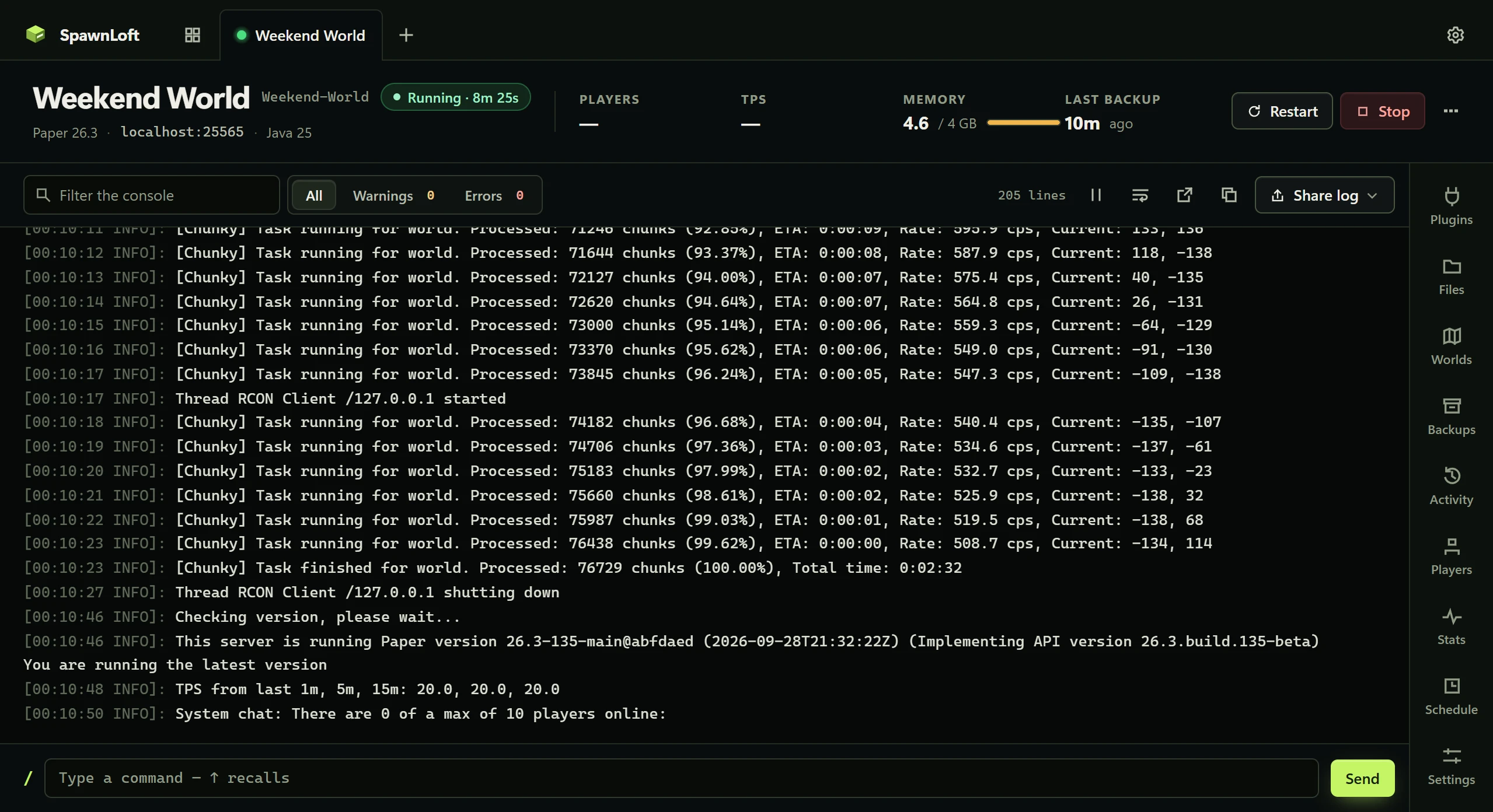
Servers
Each server is a tab across the top; a server's tools (Plugins, Worlds, Backups, Players, Stats, Schedule, Settings) open from a dock beside its console. Settings and Backups open full width with the console's newest line and error count along the bottom.
| Action | Behavior |
|---|---|
| Add a server | Create one, which downloads the server and reports real progress, or point SpawnLoft at a folder you already have. Nothing is moved; ports and the RCON password are read from that folder's server.properties. |
| Rename, reset, delete | Require typing the server's name. A dialog that only says "are you sure" gets answered reflexively. |
| Server card | Status lamp, port, memory and a live uptime. |
Added in 1.4
The tabs-and-dock layout and the overview below were added in SpawnLoft 1.4. Earlier versions list servers down the side and show one tool at a time.
Overview
The first tab shows every server: state, players, TPS, memory and last backup, with Start or Stop on each card, and how much of the machine's memory the servers may use between them. A Needs attention row collects what wants doing, each with the one button that resolves it:
- a server that crashed, or was restarted by crash guard, today
- plugin updates found by the last check
- a server never backed up, or not backed up in a week
- a Java too old to start a server
Console
| Feature | Behavior |
|---|---|
| Search and filter | Search, filter to warnings or errors, pause, copy, wrap, line numbers, bounded scrollback |
| Log level | A coloured rail in the gutter, not recoloured text, so ERROR stands out without becoming harder to read |
| Stack traces | Inherit the level of the line above, so filtering to errors shows the whole failure |
| Text | ANSI escapes are stripped into clean, searchable text. Long lines scroll horizontally; turn on Wrap to fit them. |
| Export | Saves a .log beside the server's snapshots, or uploads to mclo.gs after a dialog that says what is in it. See Security. |
Plugins and Mods
Search and install from Modrinth and Hangar together, each result naming its source, filtered or checked against this server's version, with checksum-verified downloads, an update check, and one-click updates behind a plugins snapshot. Hangar projects that host downloads elsewhere are linked, not installed. Fabric and NeoForge servers get Mods in its place.
The tool manages only what SpawnLoft installed; it records provenance beside the jars. A custom or premium plugin dropped in by hand is never offered a meaningless update and never has its hash sent to anyone. spawnloft plugins <name> lists the full inventory with a source column. Enable and disable rename the jar in place, so a disabled plugin keeps its spot and its config.
Added in 1.4
Plugins lists everything in the folder, hand-added jars included, and when a check finds updates it can install them all behind one snapshot and restart.
Worlds
Every world is listed with the active one named. Import a downloaded map from a zip or folder (found however deeply nested, never overwriting), export a world as a zip, switch which world runs, or delete one. Only the active world is included in snapshots.
Backups
Take a snapshot at a chosen scope (plugins, worlds, config, standard, full), see every snapshot with size, age and coverage, and restore, verify or delete any of them. Restoring is refused while the server runs, because extracting over files a live server holds open corrupts a world rather than replacing it.
Automatic backups run on a schedule with a retention limit, and the limit only removes snapshots its own schedule produced, never one taken by hand or before a reset. History refreshes every four seconds while visible, including backups made with the CLI. An archive appears only after it and its manifest are complete. See How it works.
Players
Everyone the server knows, gathered from operators, bans, the whitelist, the name cache and the world folder, since none of them is a complete list alone. Search, filter to operators or the banned, and op, ban or delete a player's world data. Connected players are marked and sorted first; that has to be asked of the server, because a player's file is not written until they log out. Changes go through the console while the server runs and into its files when it does not.
Stats
CPU and memory over the last minute, five minutes, half hour, hour or four hours, sampled every ten seconds. Both scales follow the data, because a fixed 0 to 100% axis draws every ordinary server as a flat line. CPU is a share of all cores; memory is resident process memory, not only the Java heap. History survives a stop and resets on each start. Windows, macOS and Linux collect it; export readings as JSON or CSV to compare runs.
Schedule
Nightly backups, a 5 a.m. restart that warns players first, a command on the hour. Tasks run through Windows Task Scheduler, macOS launchd or Linux systemd timers, so they happen whether or not SpawnLoft is open, while you are signed in. See Scheduled work.
Settings
| Section | Contents |
|---|---|
| Server | The server.properties fields below, memory, and Java |
| Server software | The running build, with the newest build or a newer Minecraft version offered (Paper, Purpur, Folia, Advanced Slime Paper) |
| Databases | Connection details and Create a database. See Databases. |
| Whole file | server.properties edited as text: the RCON password stays hidden, managed ports cannot be changed, and the file is snapshotted first |
| Key | Setting | Type | Range or values | Default |
|---|---|---|---|---|
online-mode | Who can join | Toggle | Mojang accounts or any name | true |
motd | Message of the day | Text | A Minecraft Server | |
difficulty | Difficulty | Choice | peaceful, easy, normal, hard | easy |
gamemode | Default game mode | Choice | survival, creative, adventure, spectator | survival |
max-players | Max players | Integer | 1 to 1000 | 20 |
pvp | PvP | Toggle | true | |
white-list | Whitelist | Toggle | false | |
view-distance | View distance | Integer | 2 to 32 | 10 |
spawn-protection | Spawn protection | Integer | 0 to 256 | 16 |
Servers SpawnLoft creates start with online-mode=true, max-players=10 and spawn-protection=0. Writes never disturb another key or a comment.
Added in 1.4
Settings is one form: sections are listed down the side with a dot on any holding an unsaved change, each setting reads Default until the file has it and Changed until saved, and a bottom bar saves, discards, or saves and restarts.
Changing who can join on a world that already has players warns first. Minecraft derives an offline UUID from the player's name and uses the Mojang UUID otherwise, so flipping the setting gives everybody a different identity and orphans permissions, homes and inventories keyed by UUID. The panel reads the world's player data, tells the two kinds of UUID apart by version, and says how many players are affected before you decide.
Databases
Settings → Create a database creates a managed MySQL 8.4 LTS or Redis-compatible Garnet database and provides scoped credentials. Databases sit beside servers in the panel with a lamp, a console, start, stop and restart. Plugin configuration is always manual. See Databases.
Preferences
The gear opens Preferences.
| Item | Behavior |
|---|---|
| Appearance | Classic, the original palette, or SpawnLoft, matching the website |
| Data locations | Move the data folder or put servers on another drive |
| Updates | Update checks and Get beta builds |
| AI assistants | The exact MCP configuration for this install. See AI assistants. |
| Copy diagnostics | Version, Java, locations, every server's status, the panel log and the last console lines of the selected server. Never includes an RCON password or webhook URL. |
| Feedback | Something broke opens a GitHub bug report with version, Java, server status and panel log filled in and puts full diagnostics on the clipboard. A question opens Q&A and An idea opens Ideas. Nothing is sent by SpawnLoft; the browser hop is the consent. |