Minecraft servers on your own PC, without the terminal.
SpawnLoft starts a Paper, Fabric or NeoForge server on your machine, keeps its console in front of you, installs plugins from Modrinth and Hangar, takes backups that verify, and brings a crashed server back on its own. No cloud, no Docker, no accounts.
Everything a server needs, in one window
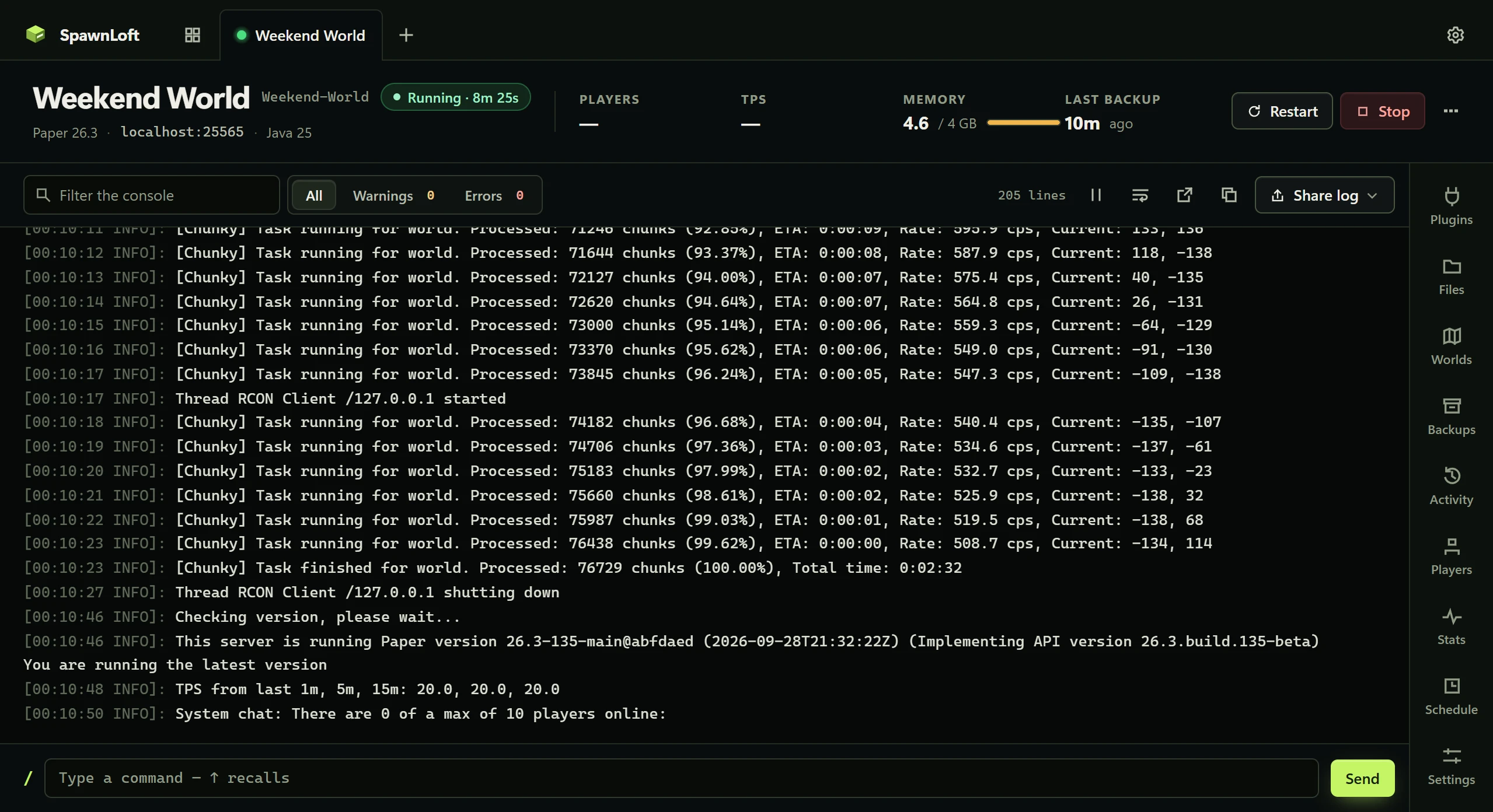
Each server gets a card, a status lamp, a console and eight tabs. The command line is there too, for anyone who wants it.
A console you can read
Search, filter to warnings or errors, pause, copy. Stack traces stay with the error that caused them. Send commands over RCON and get the reply back.
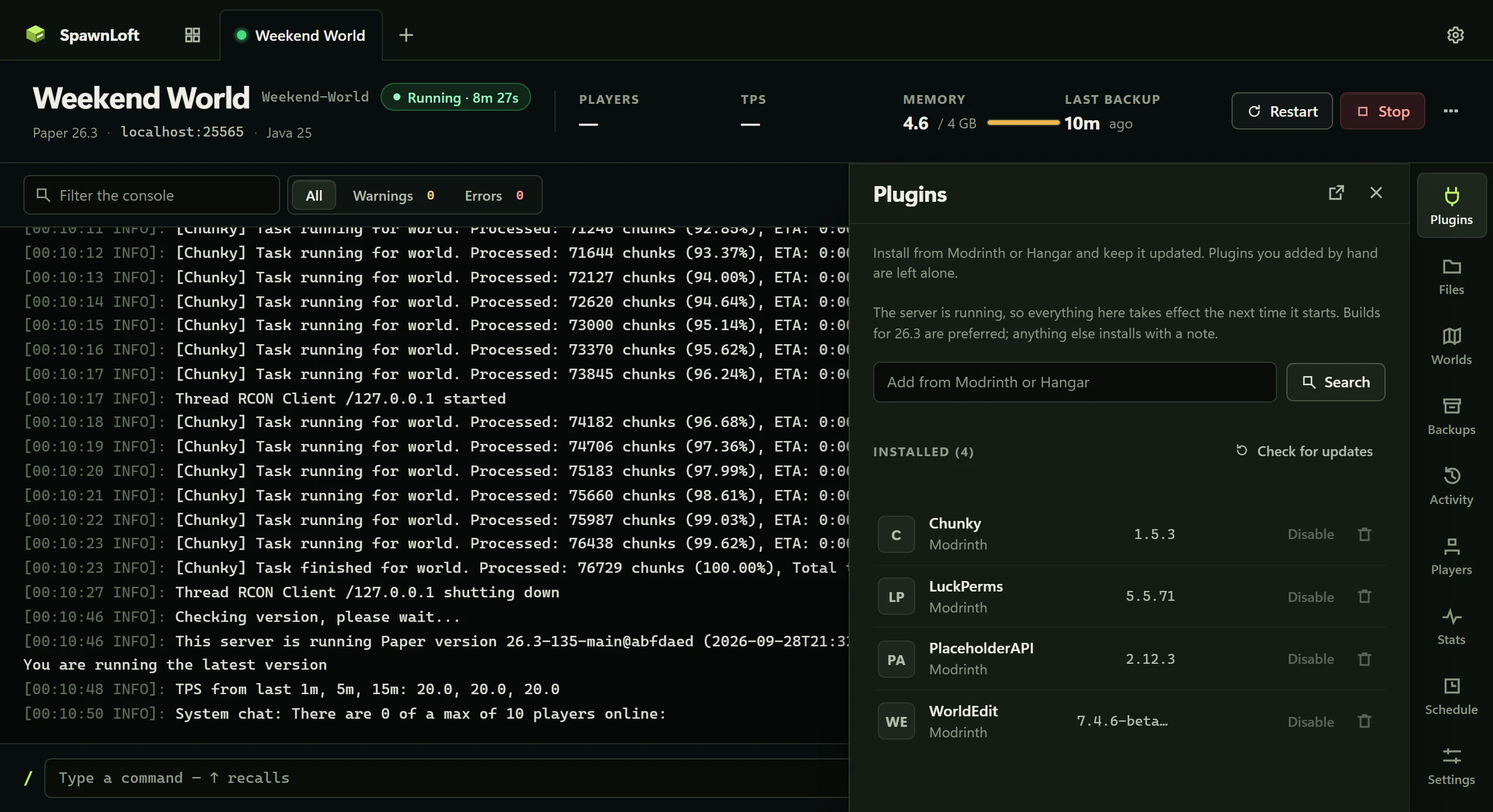
Plugins from Modrinth and Hangar
Search both at once, install builds that match your version, check for updates and apply them with a snapshot taken first. Plugins you dropped in by hand are left alone.
Backups that verify
Snapshots of plugins, worlds and config, taken hot with the world flushed first. Every one can be read back end to end, on a schedule, so you find out the week it broke.
Comes back after a crash
A crashed server restarts on its own, with a limit so a broken plugin cannot grind all night. A Discord webhook tells you what happened. The likely cause is named from the log.
Scheduled, even when the window is closed
Nightly backups, a restart at 5am that warns the players first, a command on the hour. Runs through Windows Task Scheduler, so it happens whether or not SpawnLoft is open.
Every kind of server
Paper, Purpur, Folia, Advanced Slime Paper, vanilla, Spigot, CraftBukkit, Fabric and NeoForge, or a whole modpack from Modrinth. Worlds you download drop straight in.
Have a look around
Real captures of the panel, not mockups. Scroll, and the panel follows.


- Console

A console you can read
Search, filter to warnings or errors, pause, wrap, line numbers. Stack traces stay with the error that caused them. Send commands and get the reply back.
- Plugins

Modrinth and Hangar, searched together
Every result names its source and is checked against the server's version. Updates are checked by hash and applied with a snapshot taken first. Plugins you dropped in by hand are left alone.
- Worlds

Import a map, switch worlds, export one
Every world the server holds, with the active one named. A downloaded map drops in from a zip or folder, found wherever it is nested, never overwriting.
- Backups

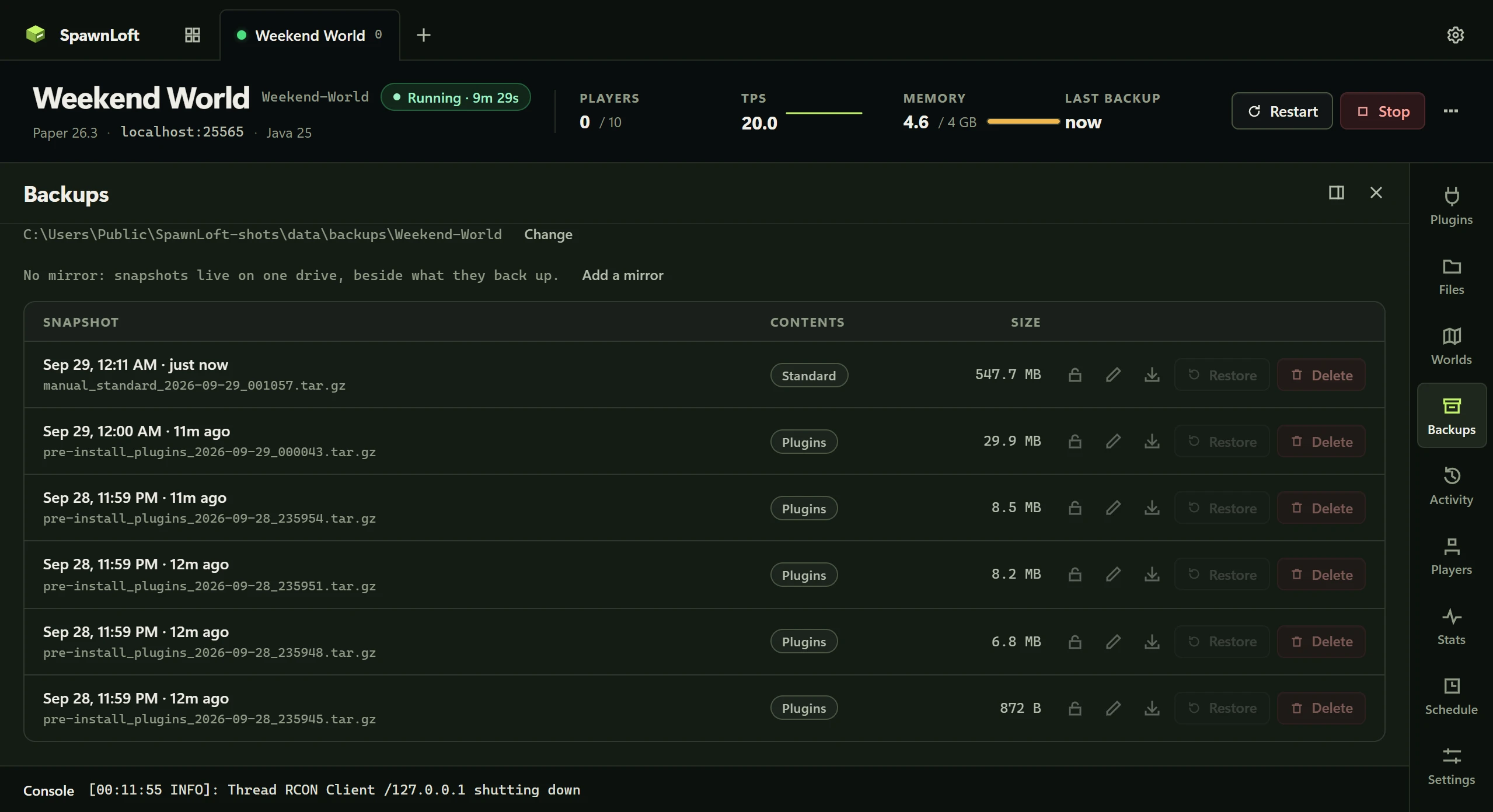
Snapshots that verify
Take one now at a chosen scope, or leave it to a nightly schedule with a retention limit. Safe while running: the world is flushed first. Every snapshot can be read back end to end.
- Players

Everyone the server knows about
Gathered from operators, bans, the whitelist, the name cache and the world folder, since none of those is complete on its own. Op, ban or wipe a player from here.
- Performance

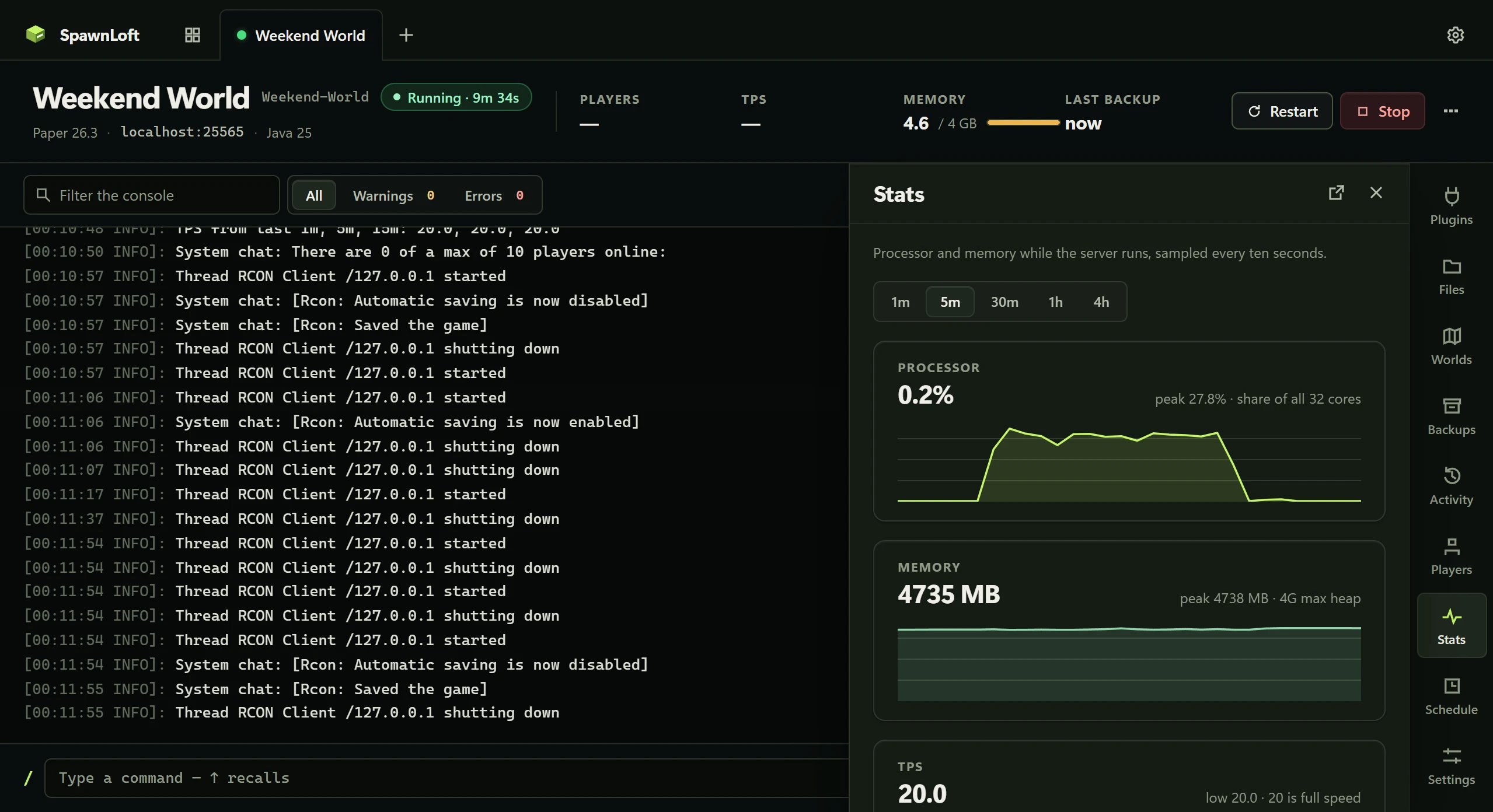
Processor and memory, every ten seconds
The last minute to the last four hours. Both scales follow the data, because a fixed 0 to 100% axis draws every ordinary server as a flat line on the floor.
- Scheduler

Backups, restarts and commands on a clock
Run by Windows Task Scheduler, so they happen whether or not the window is open. A restart can warn the players first, at the full figure, one minute, and ten seconds.
- Settings

The part of server.properties people change
Who can join, MOTD, difficulty, game mode, PvP, whitelist, view distance. Changing who can join on a world with players warns first, and says how many are affected.
How it compares
Three ways to run a server for your friends. Only one of them is free, private and does not need a terminal.
| SpawnLoft | A paid host | By hand | |
|---|---|---|---|
| Cost | Free, MIT licensed | Monthly, per server, for RAM you already own | Free |
| Where your world lives | Folders on your disk | Their machine, on their terms | Your disk |
| Console, plugins, backups | One window, eight tabs | A web panel | A terminal, a browser and a zip tool |
| Plugins from Modrinth and Hangar | Searched together, checked against your version | Sometimes, from one source | Download the jar, guess the build |
| Backups that are proven to restore | Every snapshot verified, on a schedule | A backup button, rarely tested | Whatever you remembered to copy |
| Comes back after a crash | Restarts itself, with a limit, and tells you why | Usually | When you notice |
| Accounts and cloud | None | An account, a card, their uptime | None |
| Friends outside your network | Your decision, not made for you | Built in | Your router's settings page |
Made for testing plugins
SpawnLoft began as the fastest way to reproduce a plugin bug: a clean server, on the right version, with only the plugin in question, in under a minute.
- Clone a server into a disposable copy on its own port, with fresh worlds, so you can try something without touching the real one.
- Online mode on by default, so players get real UUIDs and the log has no
OFFLINE/INSECUREbanner for an author to refuse a bug report over. - Each server picks its Java. 1.20.4 on 17 beside 26.x on 25. SpawnLoft finds what is installed and warns before a download that the version cannot run.
- Log intelligence. Port taken, wrong Java, missing dependency, out of memory, corrupt world: named in words under the vitals, with the fix.
- Share the log. Export the console to a file, or upload it to mclo.gs with your account name already taken out of the paths.

Stays on your machine
SpawnLoft is a tool for one person's PC, running servers for friends, family or plugin testing. That is a design, not a limitation.
No accounts, no cloud
Nothing to sign up for. Your servers, worlds and backups are folders on your disk, and stay there.
Nothing opened to the internet
The panel answers only this machine. Nothing touches your router. Exposing a server is a decision you make, not one made for you.
Two things leave, both on a click
A bug report opens GitHub in your browser with the facts drafted. A log goes to mclo.gs only after a dialog says what is in it.
Zero dependencies
Plain Node and the tar Windows already ships. No framework, no build step, no package that rots. Read the source: it is one folder.
Up in three steps
The installer is a normal Windows setup. Servers you already have can be added in place; nothing is moved or rewritten.
Install SpawnLoft
Download the setup, run it, and let it check for Java. If Java is missing it says so and links the download.
Add a server
Create one: pick the software and the Minecraft version, and the jar downloads. Or point SpawnLoft at a server folder you already run.
Press Start
Watch it come up in the console. Send list. Open the Plugins tab and install something. Take a backup.