
How the Descent page works
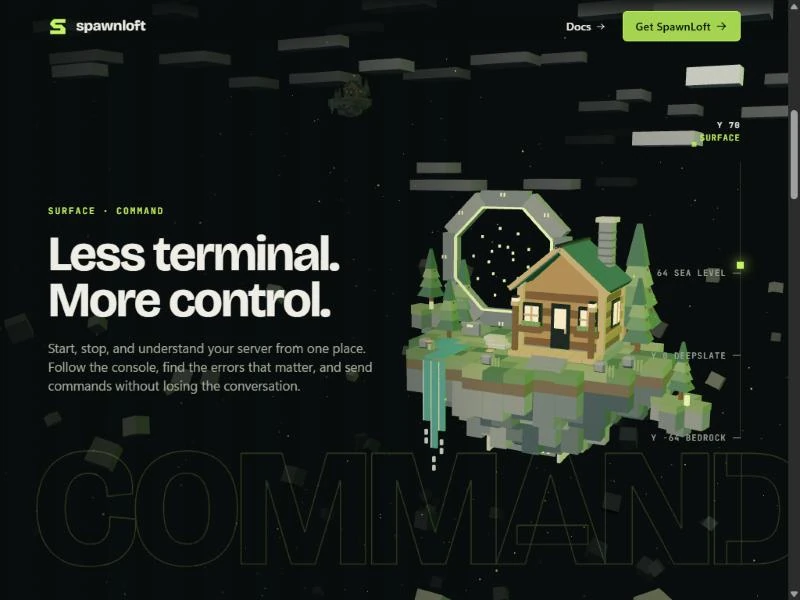
The Descent page is a single scroll. As you move down it, a camera dives through the SpawnLoft island and the world beneath it, and each feature of the app sits on the layer of the world it belongs to. The island is the one from the previous post.
The page is two files, about 250 lines of Vue and 260 lines of three.js. The first version generated its own block island in code. A follow-up replaced it with the authored Blender model, which meant retuning the camera path and the lighting for the new proportions. This post covers how the motion is put together.
One number drives everything
The page has a tall section, 640 viewport heights, and a stage inside it that sticks to the top of the screen. Scrolling the section moves nothing on the stage by itself. Instead, each frame reads how far through the section the reader is and turns that into a number from 0 to 1:
target = clamp(-box.top / Math.max(1, box.height - view.clientHeight), 0, 1)That number is not used directly. A second value chases it with exponential damping, so the motion eases in and out whatever the scroll device does:
progress += (target - progress) * (reduced ? 1 : 1 - Math.exp(-5.5 * dt))The dt in the exponent makes the smoothing the same at any frame rate. For visitors who ask for reduced motion, the multiplier is 1, so the stage follows the scroll exactly, with no easing. Because this is ordinary scrolling with a sticky stage, the scrollbar and the keyboard work as they do on any page.
The camera slows at each stop
Six keyframes sit at fixed points along the scroll, and a small function turns progress into a position along the camera's path:
export function mapU(p: number) {
  let i = 0
  while (i < KEYS.length - 2 && p > KEYS[i + 1]) i++
  return i + ease(clamp((p - KEYS[i]) / (KEYS[i + 1] - KEYS[i]), 0, 1))
}
The integer part says which segment the camera is in, and the smoothstep easing inside each segment makes it slow down as it reaches a keyframe. The effect is that the page seems to hold for a beat at each stop before the camera moves on. The same value also picks the height shown on the gauge at the edge of the page, which runs from 150 down to the real Minecraft bedrock level of -64, with marks at sea level (64) and where deepslate starts (0).
A camera on rails
The camera follows a Catmull-Rom spline through six positions, and a second spline supplies the point it looks at. The look targets sit to the left of the island, so the island appears on the right of the screen and clear of the text. Moving the targets is how each chapter gets its framing, and there is no layout code for it at all.
Three planes of motion
The headline, the paragraph, the button and the giant outlined word are not part of the 3D scene. Each frame, the page writes one CSS custom property on each chapter, --d, which is the scroll progress minus that chapter's centre. The elements read it at different strengths:
/* abridged: every layer reads the same --d */
.descent-copy :is(h1, h2) { transform: translate3d(0, calc(var(--d, 0) * -300px), 0); }
.descent-body             { transform: translate3d(0, calc(var(--d, 0) * -440px), 0); }
.descent-cta              { transform: translate3d(0, calc(var(--d, 0) * -560px), 0); }
.descent-word             { transform: translate3d(calc(var(--d, 0) * -1200px), 0, 0); }
The headline, body and button drift upward at three speeds, and the word slides sideways much faster. A chapter fades in and out through a window around its centre:
const show = smooth(clamp(1 - (Math.abs(d) - 0.04) / 0.07, 0, 1))The speeds are close together on purpose. The first version moved the body much faster than the headline, and on a phone the two overlapped while a chapter faded. Narrow screens now use smaller multipliers still.
Parallax from the cursor
With a mouse, the camera shifts a little toward the pointer. The detail that makes it look right is the order of two calls:
camera.lookAt(lookAt)
camera.translateX(cx * 3.4); camera.translateY(-cy * 2.2)
camera.lookAt(lookAt)
The camera is moved sideways and then aimed at the same target again. Near objects therefore move across the view more than far ones, which is real parallax and needs no per-object offsets. A lime point light follows the pointer a fixed distance in front of the camera, so the faces of the blocks it passes light up.
Pulling the island apart
The island's six groups are laid out each frame from the same position value:
const arrange = (u: number) => {
  const open = ease(clamp(u - 1, 0, 1))
  surface.forEach(o => { o.position.y = open * 0.8 })
  core.position.y = -open * 2.0
  satellites.position.y = open * 0.9 + (reduced ? 0 : Math.sin(time * 0.7) * 0.08)
  satellites.rotation.y = reduced ? 0 : Math.sin(time * 0.25) * 0.3
}
Nothing happens until the camera passes the Command chapter. After that, the surface and portal lift, the foundation stays where it is, and the server core drops out underneath. The satellites rise and sway a little, and with reduced motion they rise without the sway.
Backups as ghost islands
The Protect chapter needed a picture of scheduled backups. The page uses five copies of the island's surface stacked in the dark below it, each dimmer than the last, with labels reading NOW, 6 H AGO and so on.
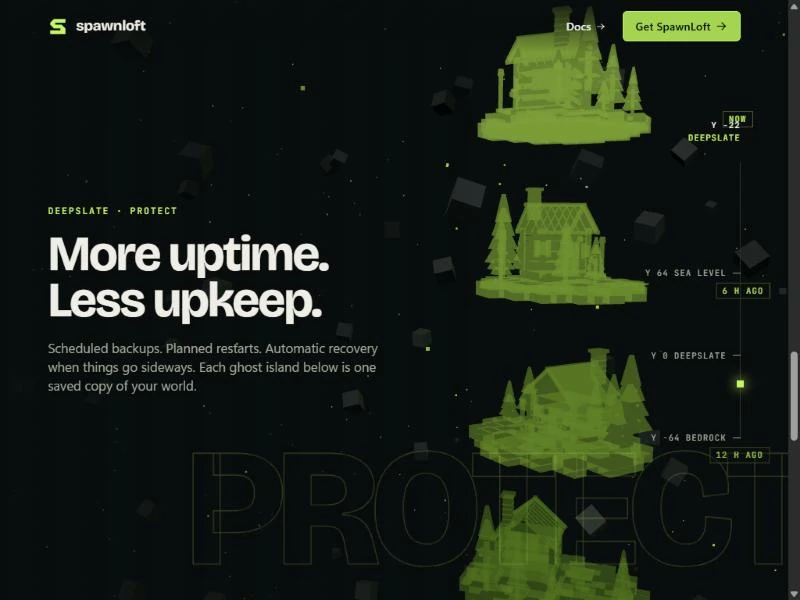
Each ghost is a clone of the World group that shares its geometry, so the copies cost very little memory. The material took two tries. The first version made the copies transparent, and overlapping surfaces piled up into a bright lime blob in which the cabin could not be seen. The version that shipped uses a dim, mostly opaque material that glows a little:
const ghost = new T.MeshLambertMaterial({ color: 0x1b2a12, emissive: lime.clone().multiplyScalar(0.3 * (1 - s * 0.16)), transparent: true, opacity: 0.8 - s * 0.08 })The labels are ordinary HTML. The scene exposes a function that projects each copy's 3D position onto the screen, and the page moves a label there every frame, so the text stays sharp and selectable.
Keeping it cheap and safe
- Three.js and the model load lazily, after the page's text has rendered. The first chapter's copy is visible from the stylesheet alone, so the first view is complete before any script runs.
- The debris, the clouds and the rising embers are drawn with instancing and a single point cloud, so hundreds of objects take only a few draw calls.
- Debris is never placed within a few units of the camera's path, so nothing flashes across the lens.
- Rendering pauses when the stage is off screen or the tab is hidden, and the pixel ratio is capped at 1.5, or 1.25 on narrow screens.
- If WebGL fails or the context is lost, the copy stays over a plain backdrop.
A bug worth knowing
One bug left the opening headline on screen over later chapters. The page set each chapter's opacity directly from the scroll loop, and Vue re-applied its own :style binding for the first chapter on every re-render, which put the opacity back to 1. The fix was to remove the binding and set the resting state in CSS instead:
.descent-panel.first { opacity: 1; }An inline style written by a script now wins from the first frame on, and the page is still complete before any script has run.
Limits
Frame rate on older hardware has not been measured yet, so this post does not promise any numbers. The page is also still unlisted for search engines. Everything above is in the site repository, starting with Descent.vue and world.ts.